> This is the article version of a talk I presented a the Zurich
> Gophers Meetup on 2022-10-25, with some less relevant parts
> shortened.
>
> The slides are also available at
> https://blog.gnoack.org/talks/go-landlock.
{.info}
## Motivation
 I started to get interested in computer security about 20 years ago.
In the late 90's and early 2000's, buffer overflow exploits were all
the rage and started to be more widely understood and researched.
This image depicts a high level overview over a common pattern of a
technical attack ("exploit") on a computer program:
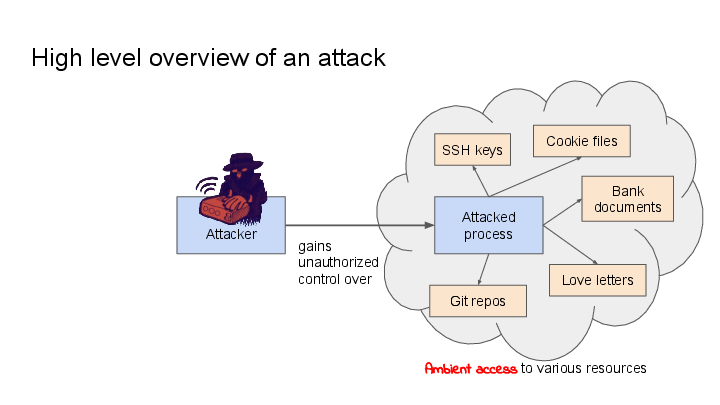
I started to get interested in computer security about 20 years ago.
In the late 90's and early 2000's, buffer overflow exploits were all
the rage and started to be more widely understood and researched.
This image depicts a high level overview over a common pattern of a
technical attack ("exploit") on a computer program:

The attack channel can take many forms, such as
over the network, by invoking a privileged executable file, or by
distributing crafted input files.
The attacker talks to the attacked process through the same channels
like any other user would do. But unlike another user's input, the
attacker's input is maliciously crafted to trick the attacked process
into misinterpreting or wrongly validating it, and thereby doing
things on behalf of the attacker that it was not originally designed
to do.
This can range from exposing process-local memory (e.g.
[Heartbleed](https://en.wikipedia.org/wiki/Heartbleed)), to exposing
the contents of files that were not intended to be exposed (e.g.
[directory traversal
attacks](https://en.wikipedia.org/wiki/Directory_traversal_attack)),
to even giving the attacker full control over the attacked process
(e.g. a [classic buffer overflow
exploit](https://en.wikipedia.org/wiki/Buffer_overflow#Exploitation)).
Now all of this would be less critical, if the attacked process only
had access to the resources that it needs for execution, but as it
turns out, in the normal UNIX model, access rights are usually
determined by the user that a program runs as, and that often means
that these programs have access to significantly more things than they
need. ([Ambient
Authority](https://en.wikipedia.org/wiki/Ambient_authority)).
For instance, programs that you run on your desktop are going to have
access to your bank documents, your (hopefully encrypted) SSH and PGP
keys, your cookies, your git repositories, etc.
-- so: **Let's limit this ambient access!**
## Philosophy
I can't speak for Mickaël Salaün's vision for sandboxing, but this is
mine, and it aligns very well with Landlock's approach.
First of all, I hold the belief that:
> **Software authors are generally well-meaning**. They want their
> software to work, and to be secure. If provided with the right tools
> for securing applications, they will use them.
{.info}
However, if we take a look at the adoption of unprivileged sandboxing
on Linux (namely, seccomp-bpf), it shows that there are only a handful
of programs making use of it -- but what is the reason for that?
Which leads me to this hypothesis:
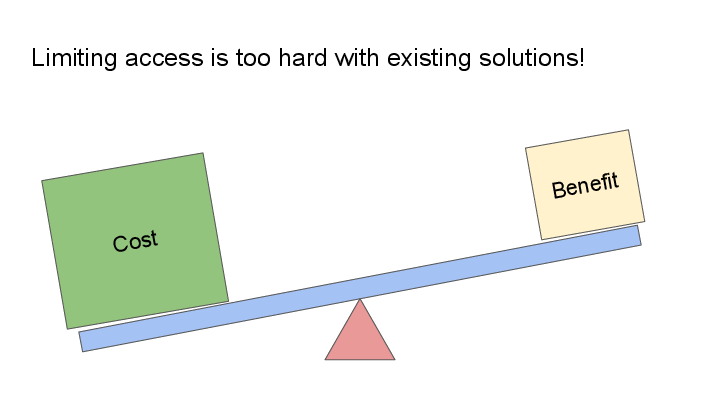
> **It is too difficult** for software authors to confine their software
> to have *just* the access that the software needs, even though these
> software authors are in the best position to reason about the required
> scope of access.
{.info}
### The Landlock approach
There are two main points that I'd like to push for in Go-Landlock,
which I think make it more usable for sandboxing than other
approaches:
#### 1. Make it really easy to use
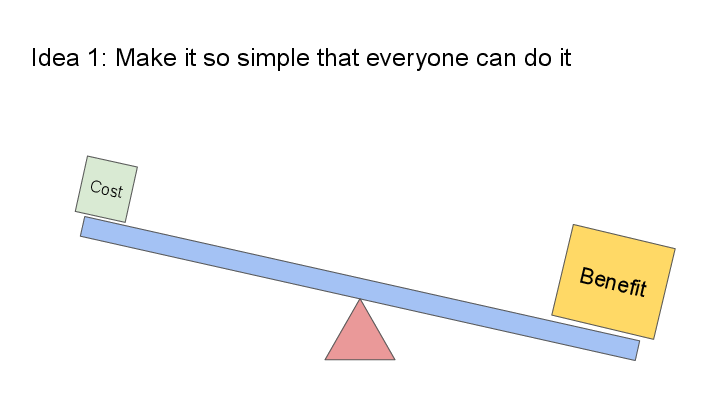
The existing confinement approaches on Linux tend to be too difficult
to set up or maintain, which means that they don't get used as much as
they should.
#### 2. Make sandboxing enablement part of program initialization
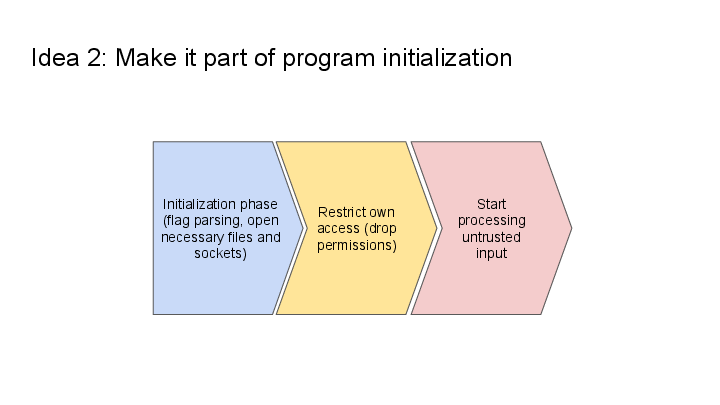
This is the other main idea -- it should be up to each process to
enable its own sandbox.
The rough approach is:
* The program **initializes itself** -- parses flags, opens the necessary files, named UNIX sockets, etc.
* The program **restricts its own access** (using Landlock)
* The program **starts processing untrusted input** from potentially malicious sources
> Note: **If programs sandbox themselves, they can drop more permissions**,
> because they can also drop the permissions that were required for
> their initialization phase.
>
> UNIX enforces permissions when *opening* files, so an already opened
> file can continue to get used by a process, even when it does not have
> the permissions to open the file again.
{.info}
### Other operating systems
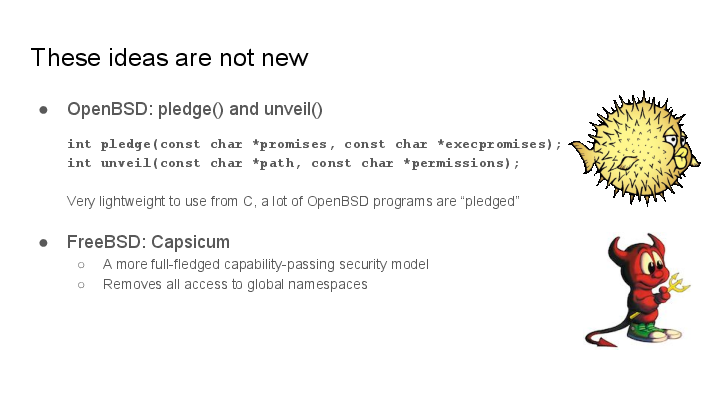
These ideas are not new - OpenBSD has demonstrated the feasability of
this approach with `pledge()` and `unveil()`, which is now used in
[many of OpenBSD's userland
programs](https://github.com/openbsd/src/search?l=C&q=unveil). Various
slide decks on the topic can be found at
https://www.openbsd.org/events.html.
[Capsicum on FreeBSD](https://wiki.freebsd.org/Capsicum) is another
unprivileged sandboxing mechanism, which is used in Chromium and other
programs (see its homepage). Capsicum is a flexible capability system,
but it also has a larger API surface.
### Other Linux sandboxing technologies
A deeper discussion of seccomp-bpf and the various Linux Security
Modules would be beyond the scope of this article.
For a discussion of the other unprivileged sandboxing mechanism, see
[my previous article about
it](https://blog.gnoack.org/post/pledge-on-linux/) on this blog.
The other Linux sandboxing mechanisms are either only available to
privileged users, or they are still very difficult to set up.
## How to use Go-Landlock
This diagram shows the overall approach for program initialization
when using Landlock (it's a more detailed view of the program
initialization overview diagram from above):
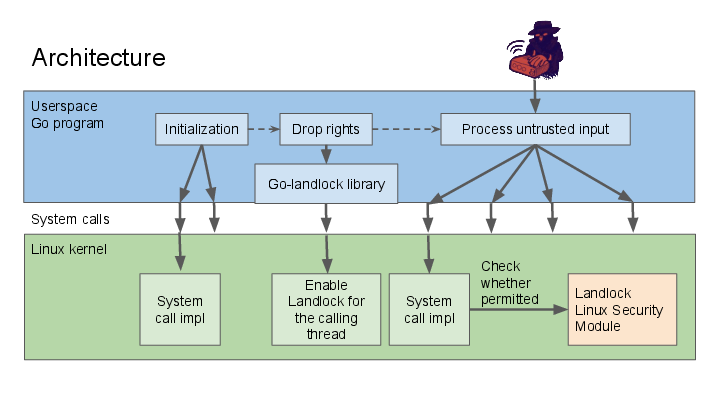
The important parts here are:
* Primarily, **Landlock is a Linux kernel feature** -- the access
policies enforced through Landlock apply to both the enforcing
program, as well as all newly forked subprocesses, independent of
the libraries being used to do these accesses.
* The **Go-Landlock library is only required to configure and enforce
the Landlock policy**.
The steps required to enforce Landlock are:
### Step 1: Make sure your kernel supports Landlock
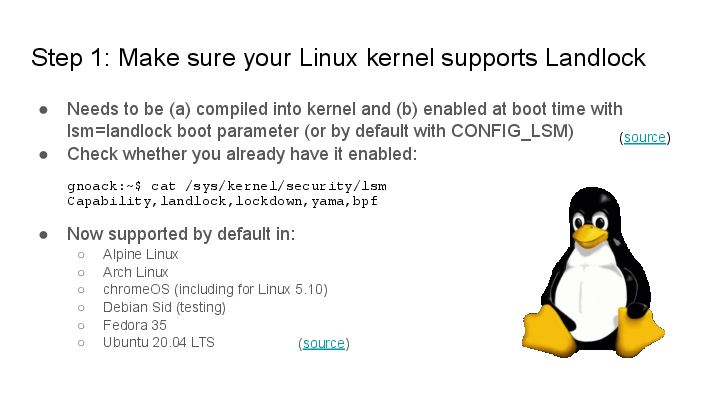
**For development**, it's recommended to double check that Landlock is
already working, so that you can try out your policies. Landlock is
already enabled on many major distributions today.
On most systems, you can check whether Landlock is working using `cat
/sys/kernel/security/lsm`.
On systems that do not have it yet:
* Make sure Landlock is compiled into the kernel.
* Set the `lsm=landlock` boot parameter (or configure it in
`CONFIG_LSM` at build time).
**For deployment**, you can pick whether your program should insist on
running on a Landlock-enabled kernel, or whether it should fall back
to using weaker (or no) Landlock policies on older systems:
### Step 2: State what file accesses you are going to do!
This is the only function invocation your program needs in order to
confine itself in a Landlock policy:
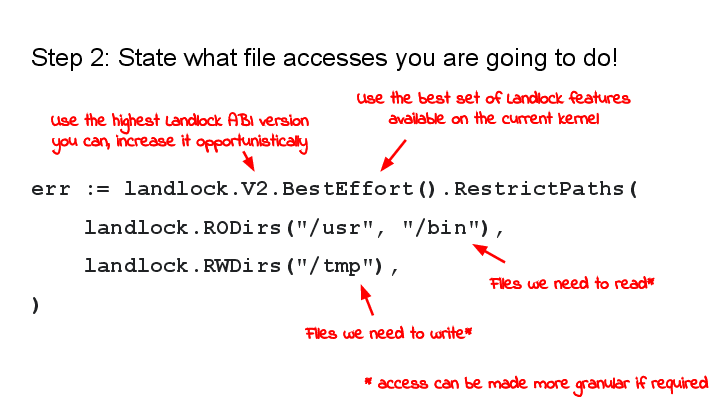
* **`landlock.V2`** determines the Landlock ABI version. A higher ABI
version means that more operations can be restricted.
(Alternatively, you can also spell out the exact operations that you
want to restrict.)
* **`.BestEffort()`** is an optional call -- it configures the library to
gracefully degrade to weaker Landlock policies on systems that do
not have the requested Landlock features.
* **`.RestrictPaths()`** is the final call which enforces the rules.
* **The arguments to `.RestrictPaths()`** are file system hierarchies
that the process intends to still access going forward. Access to
all paths other than the listed ones will be forbidden, as much as
the Landlock ABI permits. (Landlock does not currently restrict
*all* possible file system operations, but that's eventually the
goal. A more detailed look is in the appendix below.)
* **`landlock.RODirs` and `landlock.RWDirs`** are shortcuts to
identify "general read-only" operations and "general read-write
operations". This can also be configured in more detail if needed.
...and that's it. After this invocation, your program will be unable
to work with files other than the ones specified or the ones that have
already been opened before.
[Link to the full documentation](https://pkg.go.dev/github.com/landlock-lsm/go-landlock/landlock)
## Examples
This section will list a few practical examples.
### Image converter
This is a basic image conversion tool in the spirit of ImageMagick's
"convert". Multimedia processing libraries are often optimized for
performance and can be particularly prone to programming bugs, and we
want to protect against attackers providing malicious image files as
input.
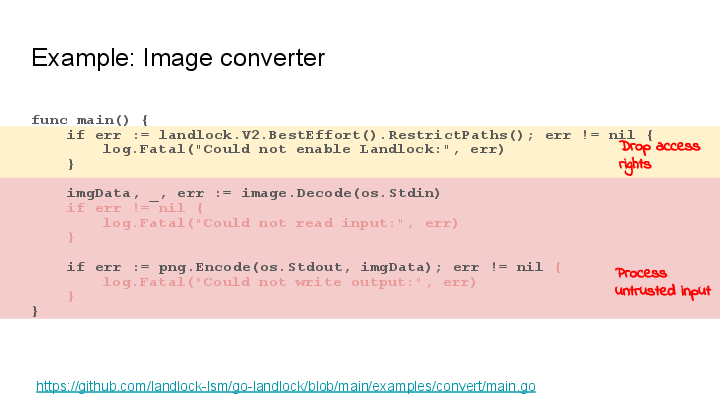
In this example, the Landlock invocation happens right at the start
and is `landlock.V2.BestEffort().RestrictPaths()`:
* We simply restrict to **no file system access at all**.
* But we fall back to enforcing weaker Landlock policies or none, if
it's not supported by the system where the program is running.
[Link to the full example](https://github.com/landlock-lsm/go-landlock/blob/main/examples/convert/main.go)
### Web Server
This simple wiki software only needs access to the directory where the
wiki pages are stored.
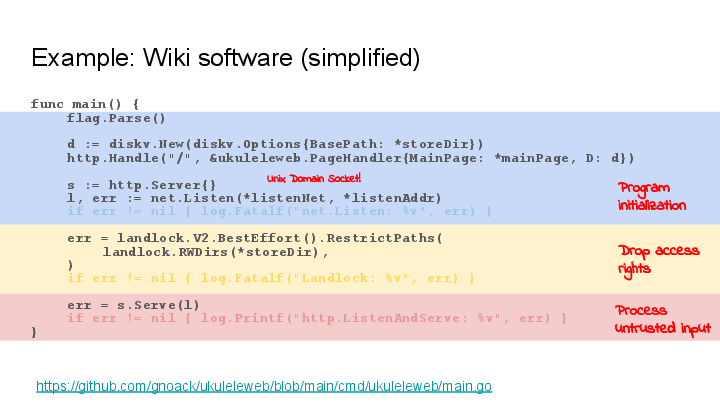
The Go-Landlock invocation is:
```go
err = landlock.V2.BestEffort().RestrictPaths(
landlock.RWDirs(*storeDir),
)
```
This gives the process the right to serve and edit the wiki pages, but
removes the rights for all other file paths (within the limits of what
is possible on the current system).
(Small side note: The `net.Listen()` call happens before Landlock
enablement -- I am using this with a named UNIX domain socket.)
[Link to the full example](https://github.com/gnoack/ukuleleweb/blob/main/cmd/ukuleleweb/main.go)
### The Go-Landlock example tool
The Go-landlock library comes with a simple example tool, which lets
you play with Landlock from bash, similar to the one in the
`samples/landlock` subdirectory in the kernel source, but written
using the Go library:
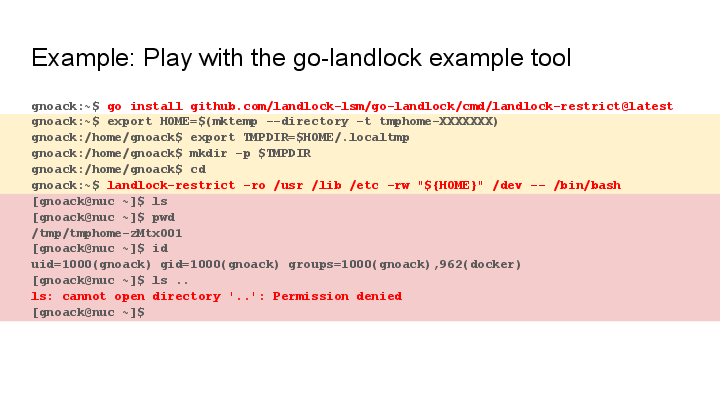
The command to install the `landlock-restrict` tool is:
```sh
go install github.com/landlock-lsm/go-landlock/cmd/landlock-restrict@latest
```
The above shell transcript starts `bash` under a Landlock policy where
it only has access to these files:
* **Read access to `/usr` and `/lib`** is needed for shared libraries
and the `bash` executable itself.
* **Read access to `/etc`** is required for some common configuration
files.
* **Write access to `/dev`** is needed for some specific files like
`/dev/null`, `/dev/stdout` and others. (Could be made more specific.)
* **Write access to $HOME**: We rewire the `$HOME` environment
variable to a temporary directory for our subprocess and set
`$TMPDIR` to a directory within it, so we can just grant write
access to `$HOME`. (This trick makes it possible to use a coarser
policy, but it lets the sandboxes process execute in a slightly less
usual environment.)
[Link to the `landlock-restrict` example tool](https://github.com/landlock-lsm/go-landlock/blob/main/cmd/landlock-restrict/main.go)
## Current Landlock limitations
Some things that Landlocked processes can never do are:
* They can not **manipulate the file system topology** (e.g. `mount`, `pivot_root`)
* Landlocked processes have the **`NO_NEW_PRIVS` flag** -- you can not execute suid root binaries
* **Restricted use of `ptrace()`** (debugging other processes)
Also,
* Landlock is *in development*
* Some file operations are not restrictable yet
* But it's already limiting the most common ones and it's already usable
### What file system operations are restrictable?
Landlock gains features and makes it possible to restrict more file
system operations. To make this observable, Landlock's ABI is
versioned. As of November 2022, the current ABI is V2.
The list of restrictable file system operations is [documented in the
Landlock
documentation](https://docs.kernel.org/userspace-api/landlock.html#filesystem-flags).
> **Warning**: Not all file system operations can be restricted
> yet. Currently, notable exceptions are file truncation (as a form of
> file modification), and various ways to observe presence and metadata
> of files (but not reading their contents).
{.warning}
In future Landlock ABI versions, new operations will start to be
configurable. Currently ongoing patch sets (as of November 2022) are:
* File truncation (currently scheduled for inclusion in kernel 6.2)
* Chmod and Chown (patch set in review)
* Networking support (patch set in review)
## Summary
In short, please try it out! The invocation is as simple as:
```
err := landlock.V2.BestEffort().RestrictPaths(
landlock.RODirs("/usr", "/bin"),
landlock.RWDirs("/tmp"),
)
```
I would love to hear your feedback!
## Further Links
For further reference, here are some additional links:
* Go-Landlock:
* On Github: https://github.com/landlock-lsm/go-landlock
* Docs: https://pkg.go.dev/github.com/landlock-lsm/go-landlock/landlock
* Landlock kernel project:
* Page: https://landlock.io/
* Kernel doc: https://docs.kernel.org/userspace-api/landlock.html
* Mailing list: https://lore.kernel.org/landlock (To subscribe, mail
[landlock+subscribe@lists.linux.dev](mailto:landlock+subscribe@lists.linux.dev))
* Some more documentation:
* [Landlock File System Access
Model](https://docs.google.com/document/d/1SkFpl_Xxyl4E6G2uYIlzL0gY2PFo-Nl8ikblLvnpvlU/edit)
(discussing the kernel API and configurable file system operations
in a more mathematical way).